# How to Test Checkboxes
Test checkboxes in Endtest Web Tests: check, uncheck, toggle, and assert the checked state of single or grouped checkboxes across any framework.
Part of the Endtest documentation (Web Tests). Canonical URL: https://endtest.io/docs/web-tests/how-to-test-checkboxes
---
## Introduction
Checkboxes allow users to select one or more options from a limited set of choices.
```html
```
# Assert if a Checkbox element is checked
If the checkbox element is checked, it will have a `checked` attribute:
```html
```
In order to determine if the checkbox element is checked or not, you have to verify if the checked attribute is present.
That can be achieved in 2 different ways:
### 1. By asserting the presence of the checked attribute
You can use the `Element Contains Attribute` assertion type from the `Add Assertion` action:

Configure that assertion to verify if the checkbox element contains the `checked` attribute.
### 2. By using JavaScript
A different approach is to use an [Execute JavaScript](https://endtest.io/docs/web-tests/execute-javascript) step.
In that step, you can fetch the `checked` property of the checkbox element.
```javascript
isItChecked = document.querySelector("css-selector-of-your-checkbox").checked;
```
Don't forget to replace the `css-selector-of-your-checkbox` string with the CSS Selector for your checkbox element.
That `isItChecked` JavaScript variable will have a value of `true` or `false`, depending if the checkbox element is checked or not.
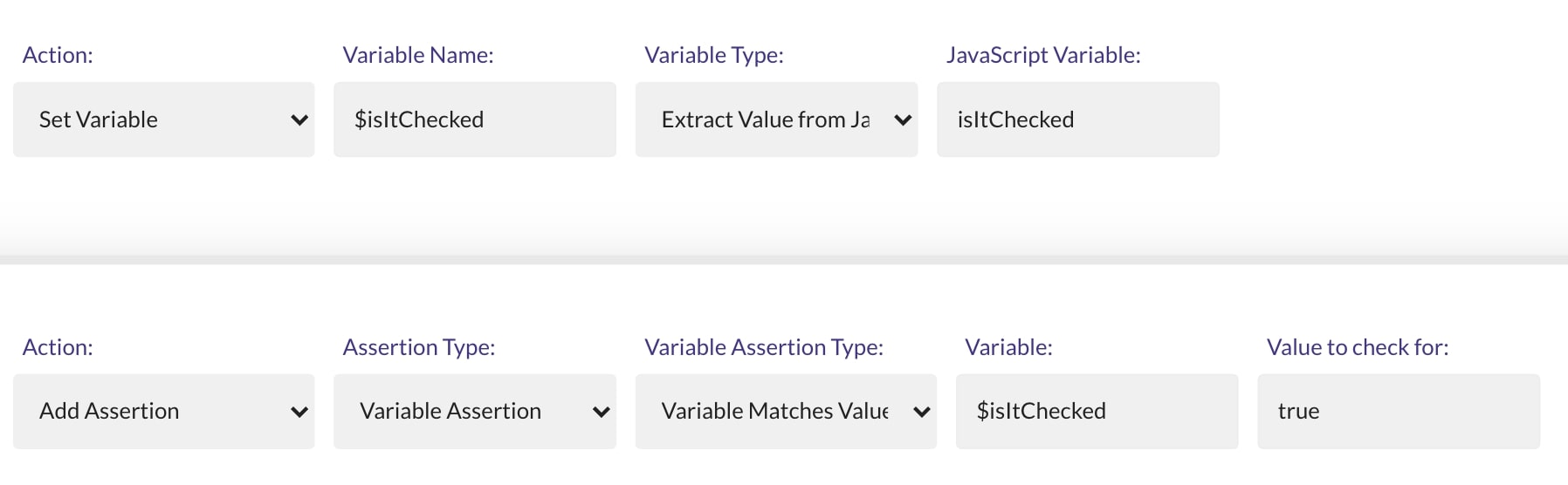
We can add an assertion for that, but first we need to transfer the value from the `isItChecked` JavaScript variable to an Endtest variable.
That can be done with the `Extract Value From JavaScript` option from the `Set Variable` action.
After that, we can use the `Variable Assertion` option from the `Add Assertion` action to verify if the value is `true`.